
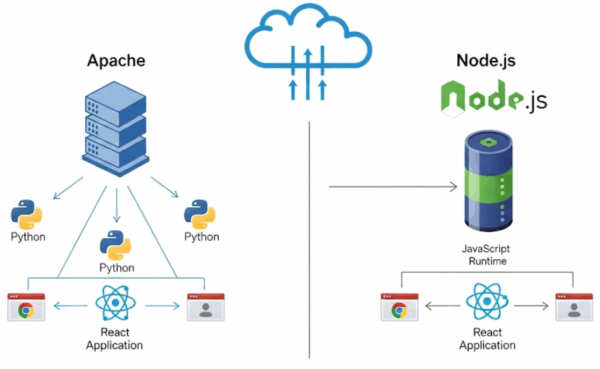
In modern web development, traditional servers like Apache and runtime environments like Node.js handle web requests in fundamentally different ways. This article explores the architectural distinctions between the two, how Node.js operates as a server, and how it integrates seamlessly with React to form a complete web application structure.
Apache vs Node.js: Structural Comparison
| Category | Apache | Node.js |
|---|---|---|
| Role | Traditional web server (serves static files, runs PHP) | Runtime environment with built-in web server features |
| Request Handling | Multi-threaded (each request spawns a new thread) | Event-driven, asynchronous (single-threaded) |
| Scalability | Resource-bound, scalable via configuration | Optimized for high-performance, real-time processing |
| Language Support | PHP, Python, Perl, etc. | JavaScript (extended via Express.js and others) |
| Use Cases | WordPress, static websites, LAMP stack | REST APIs, real-time apps, SPA backends |
How Node.js Functions as a Web Server
Node.js uses frameworks like Express.js to implement web server functionality directly. Here’s a basic example:
const express = require('express');
const app = express();

app.get('/', (req, res) => {
  res.send('Hello from Node.js!');
});

app.listen(3000, () => {
  console.log('Server running on http://localhost:3000');
});
This simple code allows Node.js to handle HTTP requests and responses without relying on Apache.
Why Node.js Can Serve as a Web Server
- Its asynchronous I/O model enables handling thousands of requests concurrently.
- Modular architecture allows developers to build lightweight, customized servers.
- Frameworks like Express, Koa, and Fastify have evolved to rival or surpass traditional server capabilities.
Serving Static Files in Node.js (Like Apache)
Node.js can serve static assets using Express:
app.use(express.static('public'));
This serves HTML, CSS, and JavaScript files from the public directory, similar to Apache’s behavior.
Node.js: Backend Runtime Environment
Core Concepts
- Node.js enables JavaScript execution outside the browser.
- Built on Chrome’s V8 engine, it allows server-side logic to be written in JavaScript.
Key Structure
| Component | Description |
|---|---|
| Express.js | Popular web framework for REST APIs, routing, and middleware |
| app.js or server.js | Entry point for the server; handles requests and responses |
| routes/ | Organizes request handlers by URL path |
| controllers/ | Contains business logic functions |
| models/ | Interfaces with databases; uses ORM or direct queries |
Capabilities
- Building RESTful APIs
- Real-time data handling (e.g., WebSocket)
- File uploads, authentication, session management
- Database integration (MongoDB, MySQL, etc.)
React: Frontend UI Library
Core Concepts
- React is a component-based UI library developed by Facebook.
- It efficiently renders interfaces and updates them based on state changes.
Key Structure
| Component | Description |
|---|---|
| App.js | Root component; defines the overall UI skeleton |
| components/ | Reusable UI elements (buttons, forms, lists, etc.) |
| pages/ | Page-level components rendered via routing |
| hooks/ | Custom logic and state management utilities |
| public/ | Static assets (favicon, index.html, etc.) |
| src/index.js | Entry point; mounts the React app to the DOM |
Capabilities
- State-driven UI rendering (
useState,useEffect) - Routing (
react-router-dom) - API communication (
axios,fetch) - Global state management (
Redux,Context API) - Styling (
CSS,styled-components,Tailwind, etc.)
Why Node.js + React Form a Complete Web Architecture
Together, Node.js and React create a fully decoupled frontend-backend structure.
Integration Flow
[React Frontend] → API Request → [Node.js Backend] → Database → Response → UI Rendering
- React handles user interaction and interface rendering.
- Node.js manages data processing, authentication, and business logic.
- Both use JavaScript, enabling unified development across the stack.
Basic Web Project Setup Example
Node.js Setup
npm init -y
npm install express
React Setup
npx create-react-app my-app
cd my-app
npm start
API Integration
From React:
fetch('http://localhost:5000/api/data')
From Node.js:
app.get('/api/data', (req, res) => res.json(...))
Summary
| Technology | Role | Structure | Capabilities |
|---|---|---|---|
| Node.js | Backend | Server, router, controller, model | API, database, authentication, real-time processing |
| React | Frontend | Component, page, state, router | UI rendering, state management, API calls, routing |