
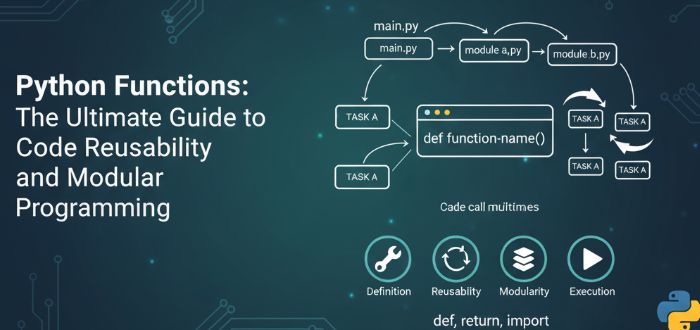
Introduction to Python Functions: Why They Matter
In the world of Python programming, functions represent a fundamental paradigm shift from writing individual statements to creating organized, reusable code blocks. While beginners typically start with sequential code execution, professional developers rely heavily on functions to build scalable, maintainable applications. This comprehensive guide will transform your understanding of Python functions and elevate your programming skills to professional standards.
What Are Python Functions and Why Are They Essential?
Python functions are self-contained blocks of code designed to perform specific tasks. They serve as the building blocks of modular programming, offering significant advantages that every developer should master:
Key Benefits of Using Functions
- Code Reusability: Write once, use infinitely
- Maintainability: Centralized code updates
- Readability: Organized and understandable logic
- Modularity: Complex problems broken into manageable pieces
- Testing Efficiency: Isolated functionality for easier debugging
Defining Your First Python Function: Step-by-Step Guide
Let’s transform basic sequential code into a reusable function. Consider this simple greeting sequence:
print("What is your name?")
name = input()
print("Nice to meet you, " + name)
Conversion to Function Structure
def hello_function():
    print("What is your name?")
    name = input()
    print("Nice to meet you, " + name)
Critical Syntax Rules for Python Functions
- Use the
defkeyword followed by the function name - Function names follow variable naming conventions (letters, underscores, numbers)
- Parentheses
()are mandatory after the function name - The colon
:indicates the start of the function body - Proper indentation (4 spaces standard) defines the function scope
Executing Functions: Simple Call Mechanism
Calling a function requires just one line of code:
hello_function()When invoked, Python executes all indented code within the function definition sequentially.
Parameter Implementation: Customizing Function Behavior
Parameters transform static functions into dynamic tools:
def greeting_function(greeting_message):
    print("What is your name?")
    name = input()
    print(greeting_message + ", " + name)

# Multiple calling variations
greeting_function("How are you doing?")
greeting_function("Hey, what's up?")
greeting_function("Welcome aboard!")
Parameters act as variables that receive values during function calls, enabling customized behavior.
Return Values: Transforming Functions into Productive Tools
Functions become significantly more powerful when they return values:
def cube_number(number):
    return number * number * number

# Practical implementation
result = cube_number(3)
print(result)  # Output: 27

# Direct usage in expressions
print(f"The cube of 4 is: {cube_number(4)}")  # Output: 64
print(f"The cube of 5 is: {cube_number(5)}")  # Output: 125
Advanced Parameter Techniques
Optional Parameters with Default Values
def flexible_greeting(greeting_message, name=None):
    if name is None:
        print("What is your name?")
        name = input()
    print(greeting_message + ", " + name)

# Both calling methods are valid
flexible_greeting("Nice to meet you", "John")
flexible_greeting("Hello there")  # Prompts for name input
Named Parameters for Enhanced Readability
# Explicit parameter naming
flexible_greeting(greeting_message="Welcome", name="Sarah")
flexible_greeting(name="Michael", greeting_message="Good morning")

# Benefits of named parameters:
# - Self-documenting code
# - Parameter order flexibility
# - Reduced errors in function calls
Variable-Length Arguments for Maximum Flexibility
def multi_add(start_value, *additional_numbers):
    result = start_value
    for number in additional_numbers:
        result += number
    return result

# Practical applications
print(multi_add(10, 5, 10, 4))        # Output: 29
print(multi_add(0, 1, 2, 3, 4, 5))    # Output: 15
print(multi_add(100, 25, 30))         # Output: 155
Real-World Function Implementation Example
Here’s a comprehensive function demonstrating practical application:
def calculate_statistics(*scores):
    """
    Calculate comprehensive statistics for a list of scores
    Returns dictionary with average, maximum, minimum, and count
    """
    if not scores:
        return {"error": "No scores provided"}

    average = sum(scores) / len(scores)
    maximum = max(scores)
    minimum = min(scores)

    return {
        'average': round(average, 2),
        'maximum': maximum,
        'minimum': minimum,
        'count': len(scores),
        'range': maximum - minimum
    }

# Implementation example
test_scores = [85, 92, 78, 96, 88, 90]
results = calculate_statistics(*test_scores)

print("=== Score Analysis ===")
print(f"Average Score: {results['average']}")
print(f"Highest Score: {results['maximum']}")
print(f"Lowest Score: {results['minimum']}")
print(f"Total Entries: {results['count']}")
Professional Function Design Best Practices
1. Meaningful Naming Conventions
# Good examples
def calculate_circle_area(radius):
def validate_user_email(email):
def generate_monthly_report(start_date, end_date):

# Avoid vague names
def process_data(input):  # Too generic
def do_stuff(x, y):      # Unprofessional
2. Single Responsibility Principle
# Well-designed function
def format_customer_address(street, city, zip_code):
    return f"{street}, {city} {zip_code}"

# Overly complex function (avoid)
def process_customer_data(name, address, orders, payments):
    # Too many responsibilities
3. Comprehensive Documentation
def calculate_compound_interest(principal, rate, time, compound_frequency):
    """
    Calculate compound interest using standard financial formula

    Args:
        principal (float): Initial investment amount
        rate (float): Annual interest rate (decimal)
        time (float): Time period in years
        compound_frequency (int): Compounding periods per year

    Returns:
        float: Final amount after compound interest
    """
    return principal * (1 + rate/compound_frequency) ** (compound_frequency * time)
Common Function Patterns for Everyday Use
Data Validation Function
def is_valid_email(email):
    """Comprehensive email validation"""
    import re
    pattern = r'^[a-zA-Z0-9._%+-]+@[a-zA-Z0-9.-]+\.[a-zA-Z]{2,}$'
    return bool(re.match(pattern, email))
Data Transformation Function
def format_phone_number(phone):
    """Standardize phone number format"""
    cleaned = ''.join(filter(str.isdigit, str(phone)))
    return f"({cleaned[:3]}) {cleaned[3:6]}-{cleaned[6:]}"
Error Handling Function
def safe_divide(numerator, denominator):
    """Division with built-in error handling"""
    try:
        return numerator / denominator
    except ZeroDivisionError:
        return "Error: Division by zero"
    except TypeError:
        return "Error: Invalid input types"
Advanced Function Techniques
Multiple Return Values
def analyze_numbers(number_list):
    """Comprehensive number analysis"""
    if not number_list:
        return None, None, None

    average = sum(number_list) / len(number_list)
    maximum = max(number_list)
    minimum = min(number_list)

    return average, maximum, minimum

# Usage example
avg, max_val, min_val = analyze_numbers([10, 20, 30, 40, 50])
Type Hints for Professional Code
def calculate_volume(length: float, width: float, height: float) -> float:
    """
    Calculate volume with type hints for better documentation
    and IDE support
    """
    return length * width * height
Debugging and Testing Functions
Strategic Debugging Approach
def debug_function(x, y, operation="multiply"):
    """Function with built-in debugging"""
    print(f"DEBUG: Inputs - x={x}, y={y}, operation={operation}")

    if operation == "multiply":
        result = x * y
    elif operation == "add":
        result = x + y
    else:
        result = None

    print(f"DEBUG: Result - {result}")
    return result
Unit Testing Foundation
# Simple test cases for your functions
def test_cube_function():
    assert cube_number(3) == 27
    assert cube_number(0) == 0
    assert cube_number(-2) == -8
    print("All cube function tests passed!")
Performance Optimization Tips
Efficient Function Design
# Optimized for performance
def process_large_dataset(data_chunk):
    """Process data efficiently with minimal memory usage"""
    return [item * 2 for item in data_chunk if item > 0]

# Avoid unnecessary computations
def optimized_calculation(x, y, z):
    # Early returns for edge cases
    if x == 0 or y == 0:
        return 0
    # Complex calculation only when necessary
    return (x * y) / z + (x ** 2) - (y ** 3)
Conclusion: Elevating Your Python Programming Skills
Mastering Python functions is not just about learning syntax—it’s about adopting a professional mindset for code organization and reusability. The transition from writing sequential code to creating modular functions represents a significant milestone in your programming journey.
Key Takeaways for Immediate Implementation
- Start Small: Begin by converting repetitive code into simple functions
- Embrace Parameters: Make your functions flexible and reusable
- Return Values: Transform functions from void operations to productive tools
- Document Thoroughly: Write clear docstrings for future reference
- Test Rigorously: Ensure your functions work correctly in all scenarios